SSEUKGEUL / GUIDE
Your first Hangul swipe.
Set up the keyboard on your watch and type your first syllable.
Getting started
Use Sseukgeul in a text field on your Wear OS watch such as a message reply or search box.
Contact us for current installation and testing instructions. Ask about installation
- Install Sseukgeul on your watch using the instructions you received.
- Open Sseukgeul in your watch’s app list and follow the prompts to enable and select the keyboard.
- Open a reply or search field and select Sseukgeul.
Swipe a consonant to add a vowel
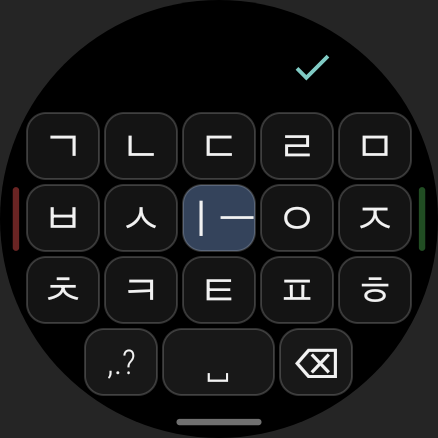
Tap a consonant to enter it alone. Hold and swipe in one direction to combine it with a vowel.
For example, swipe ㄱ right to type 가.
| Gesture | Vowel | Result on ㄱ |
|---|---|---|
| Tap | — | ㄱ |
| Swipe right | ㅏ | 가 |
| Swipe left | ㅓ | 거 |
| Swipe up | ㅗ | 고 |
| Swipe down | ㅜ | 구 |
Basic controls
- Centre vowel key: tap for ㅣ or swipe sideways for ㅡ.
- Space: tap the space key on the bottom row.
- To delete one step, tap backspace. Swipe up on it to delete the previous word.
- Keyboard mode: swipe up from the bottom bar and choose a mode. Availability depends on your version and access.
- Finish typing by tapping the check mark at the top. The next action depends on the app you are using.
FAQ
Is this a phone keyboard?
Sseukgeul is a keyboard for text fields on Wear OS watches.
Why do I get only a consonant when I swipe?
Increase swipe sensitivity in Sseukgeul settings. If tapping adds an unwanted vowel, lower the sensitivity.
Can I resize or move the keyboard?
Adjust its width and key height in settings. You can also move it up or down.
Where are English, symbols and saved phrases?
Availability depends on your version and access. Tell us your app version so we can help.
What should I include in a support request?
Tell us your watch model and Sseukgeul version. Include the app you were typing in and the steps that led to the issue. Keep private messages and sensitive input out of your report.
Based on the Sseukgeul Watch User Manual v0.1 dated September 10, 2026. Screens and features may vary by installed version.